From Master Plan to Daily Tasks. Tracked.
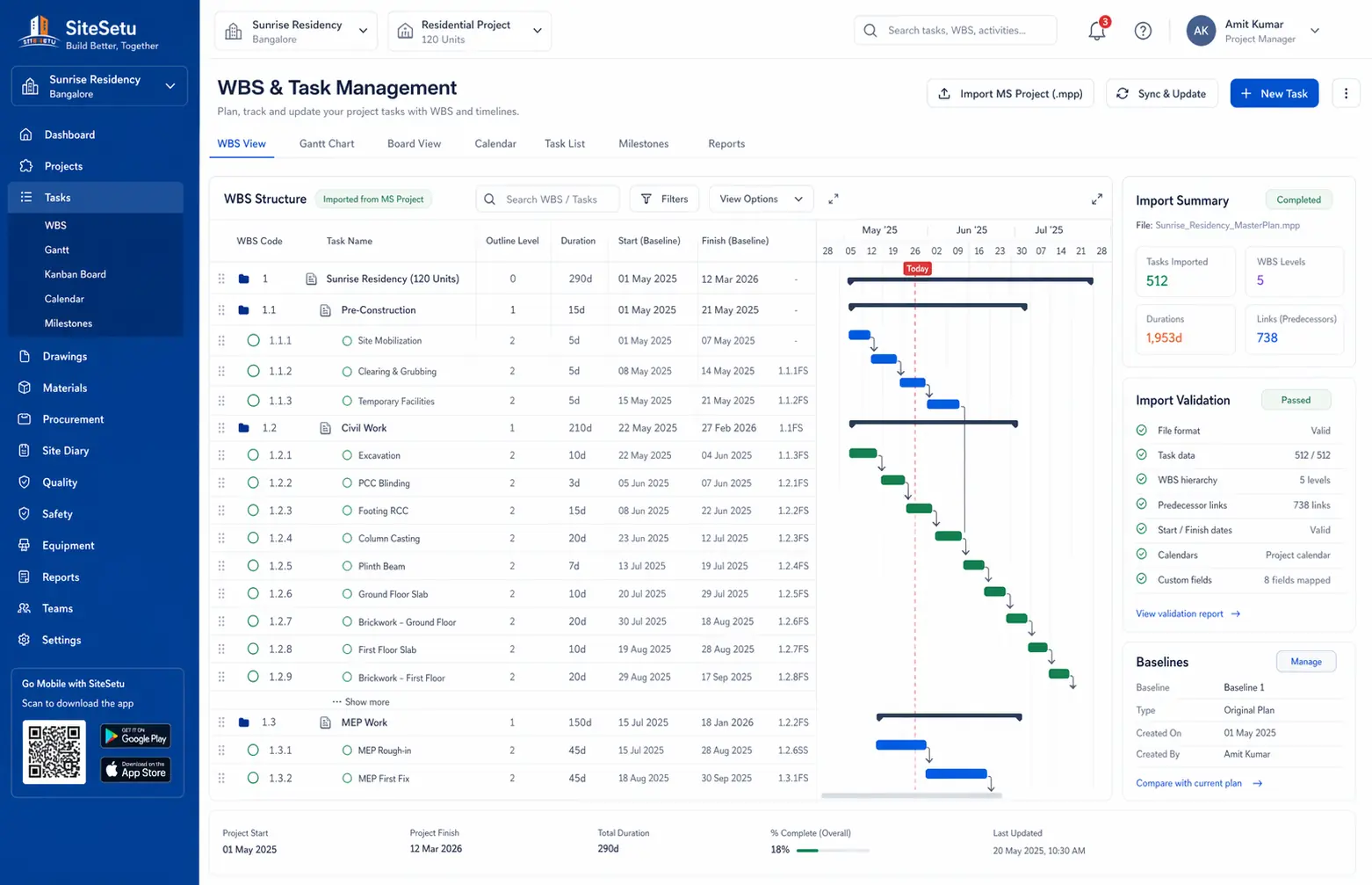
Site Setu is construction WBS and task management software with MS Project import, dependency-aware planning, and location-based progress tracking that keeps site and office teams aligned on real execution.
Sound Familiar?
Why Teams Choose Site Setu for Task Management
Purpose-built for Indian construction workflows, not adapted from generic project management tools.
MS Project Import
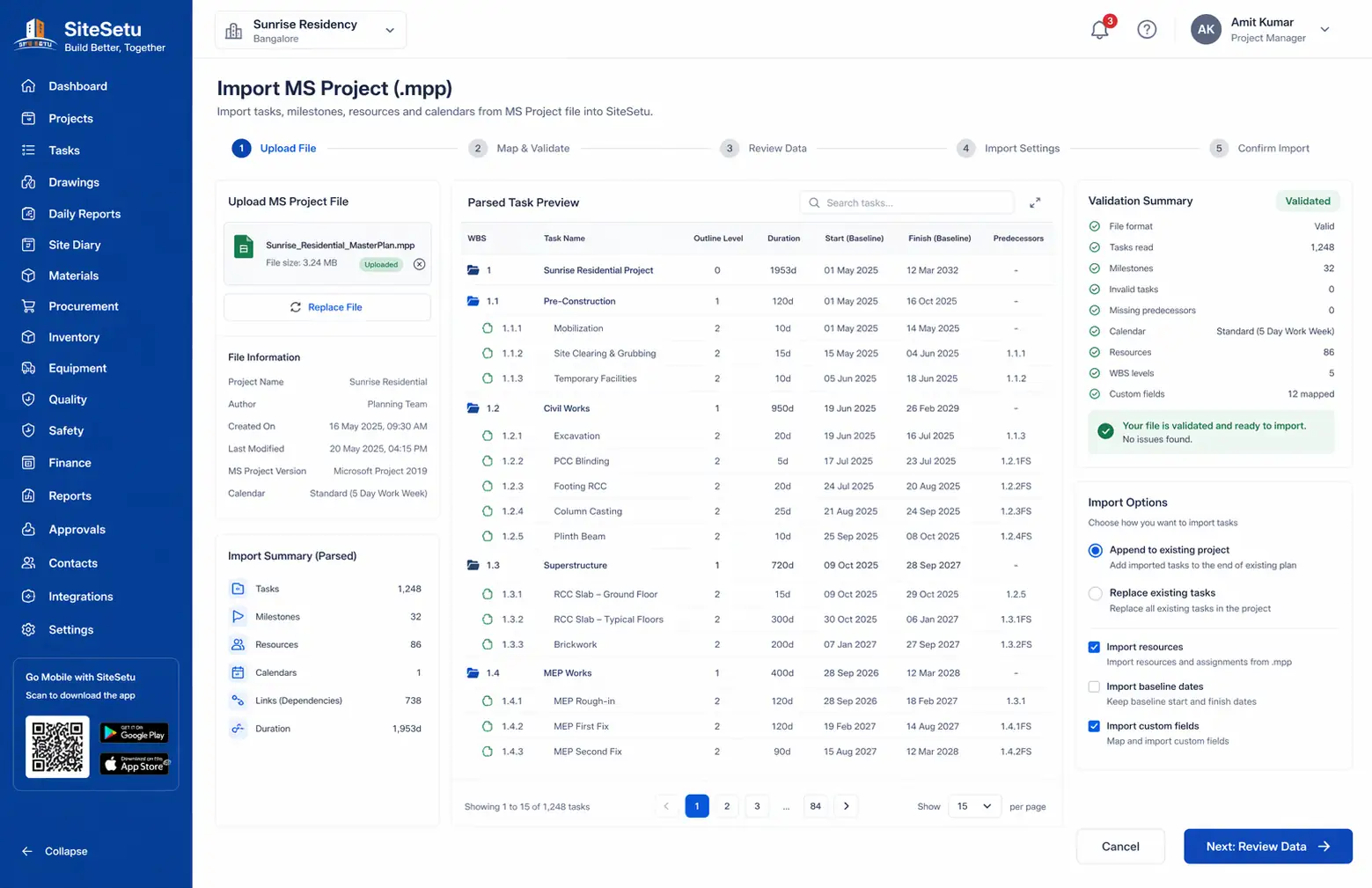
Import your existing MPP files directly into Site Setu. Maintains task hierarchy, dependencies, and scheduling logic from MS Project.
Dependencies & Timeline View
See tasks and dependencies as a timeline so your team can understand sequencing and upcoming work at a glance.
Location-Based Tracking
Link tasks to specific locations in your project hierarchy. Track progress by tower, floor, or unit for detailed visibility.
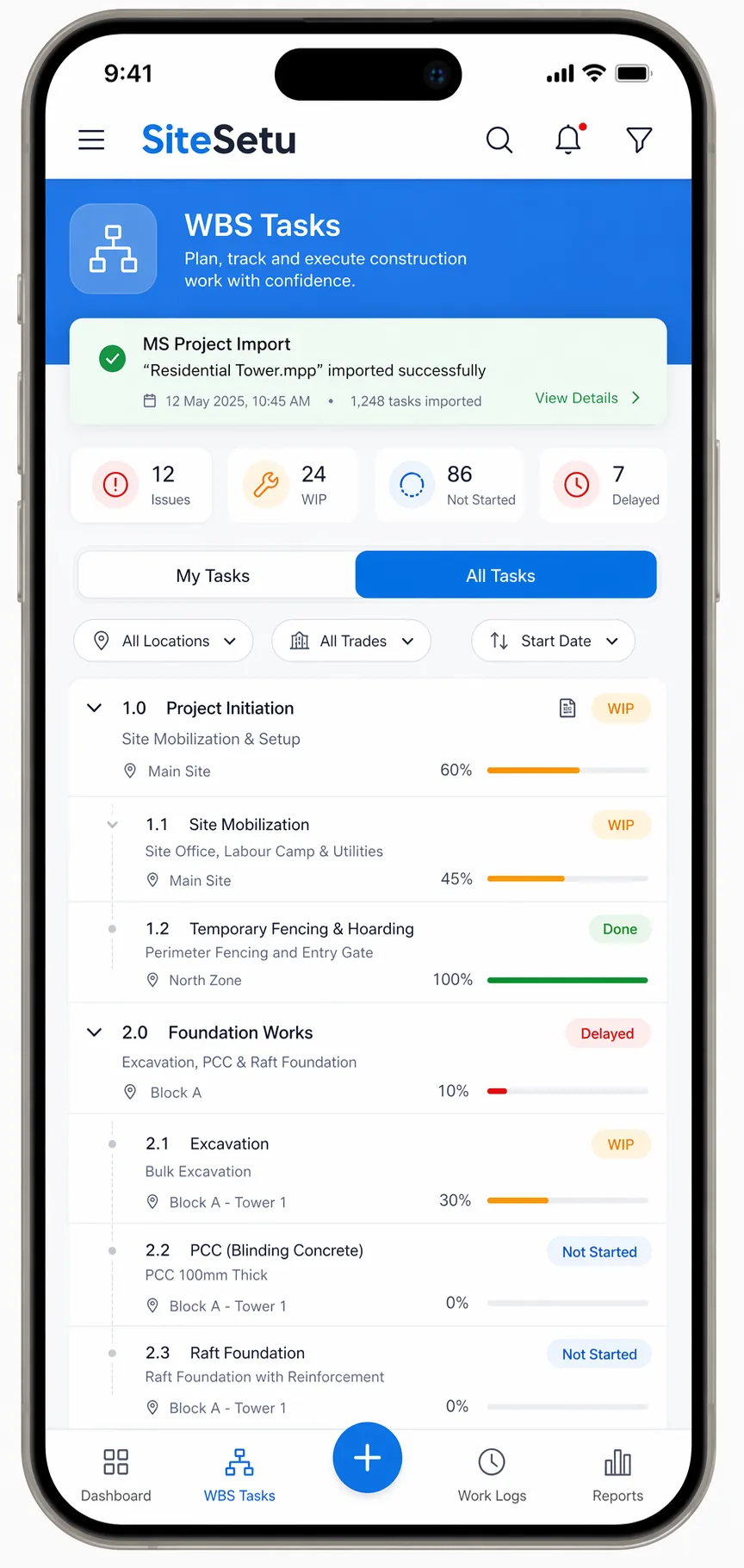
Mobile Progress Updates
Site teams update task progress from mobile devices with photos and notes for better accountability.
How It Works
From project setup to daily operations, here's your workflow with Site Setu.
Import or Create Your Schedule
Upload your existing MPP file or build your WBS from scratch. Link activities with dependencies.
Assign to Locations & Teams
Map tasks to your LBS structure. Assign responsible engineers. Set target dates.
Site Teams Update Progress
Engineers update completion on mobile with photos and notes.
Review Timeline & Dependencies
Use the timeline view to spot slips early and keep sequencing realistic as work progresses.
Keep Everyone Aligned
Share consistent progress updates between site and office without manual consolidation.
Feature Deep Dive
Every capability you need for end-to-end project scheduling and tracking.
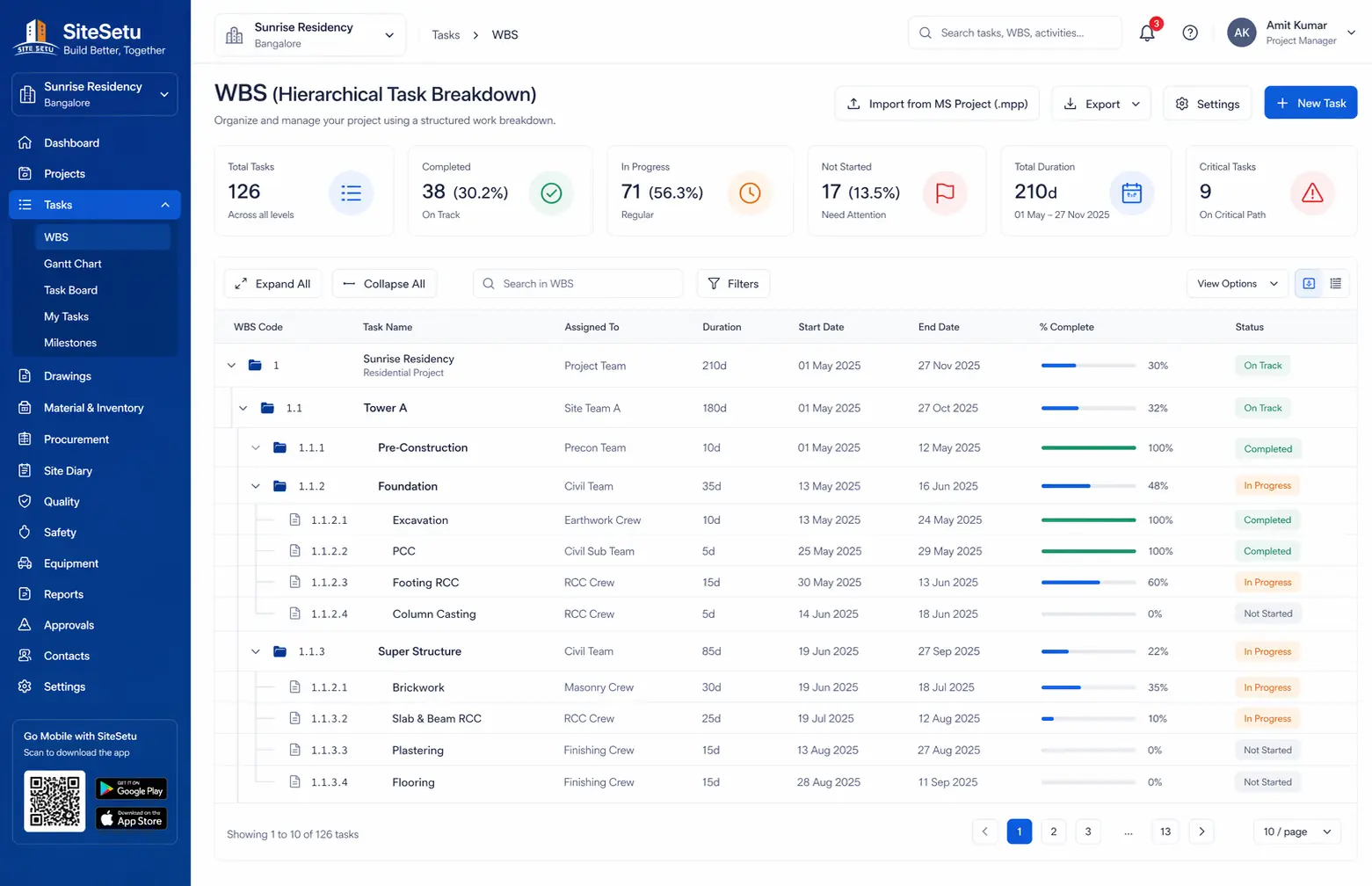
Hierarchical Task Breakdown
Define projects with unlimited WBS levels and predecessor/successor links imported from MS Project.
MS Project Import
Import .mpp files and keep hierarchy and dependencies so planning doesn’t restart from scratch.
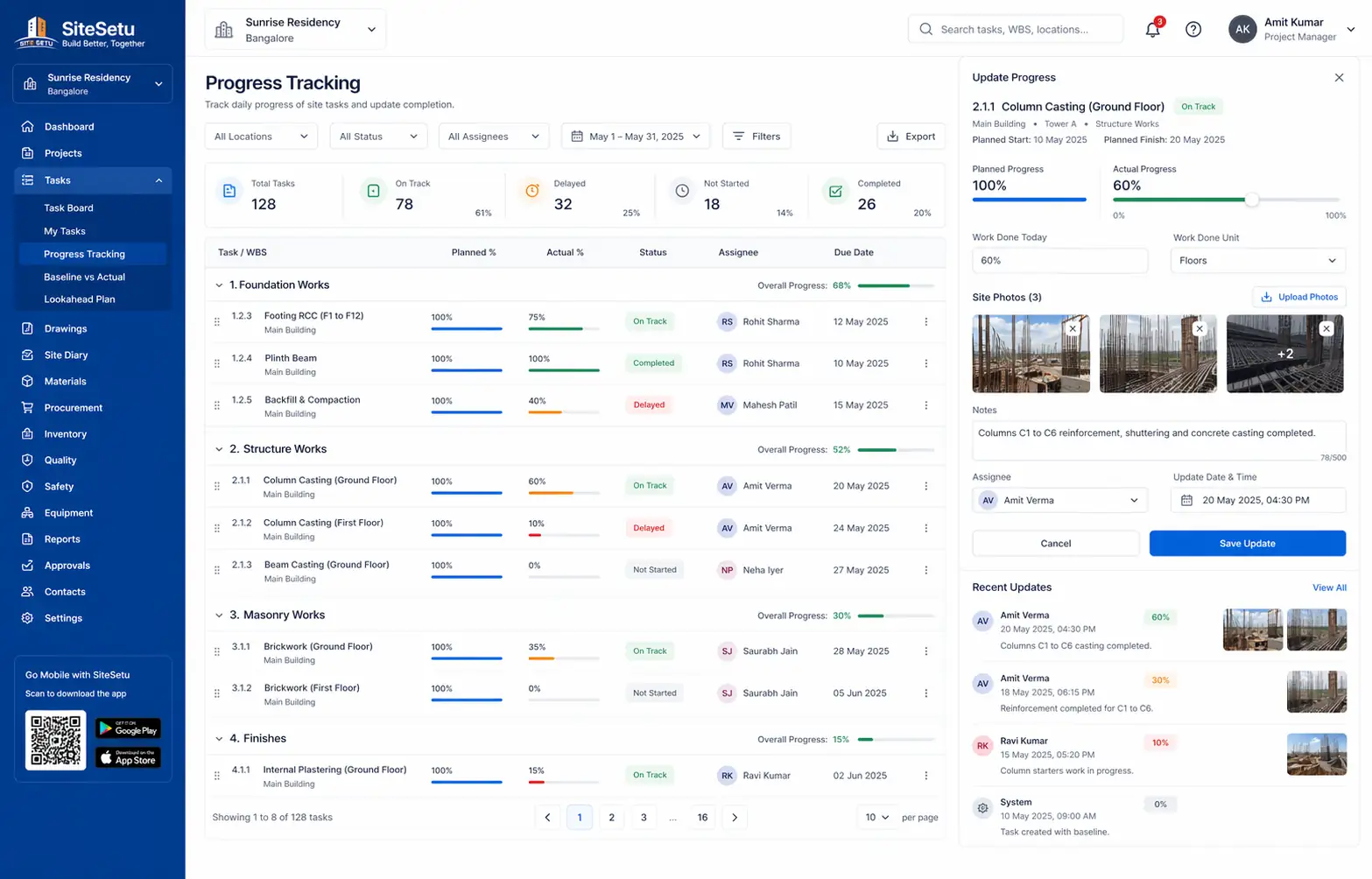
Progress Tracking
Update completion percentage, add notes, and attach photos to keep progress updates concrete.
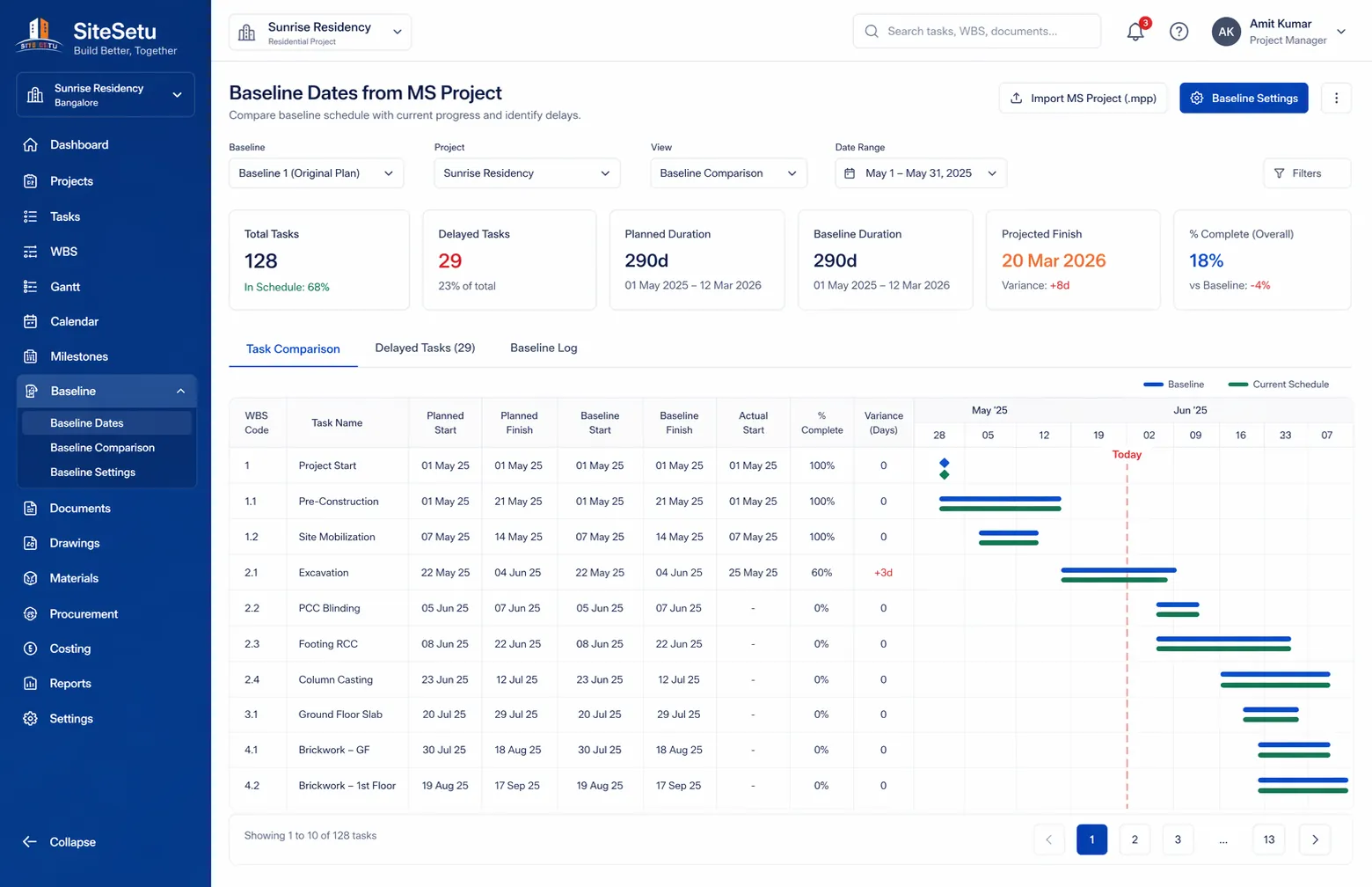
Baseline Dates (From MSP)
If your MS Project plan includes baseline dates, Site Setu preserves them during import for reference.
Seamlessly Integrated
Task management works best alongside the rest of your Site Setu workflows.
+ Inventory
Keep material plans alongside tasks so teams coordinate what is needed.
+ Procurement
Align indents and purchases with planned activities so materials arrive on time.
+ LBS
Map tasks to locations - towers, floors, units. See progress by location for handover planning.
+ Files
Attach relevant drawings to tasks. Site teams access the right version at the right time.
Explore Related Modules
Extend scheduling workflows across materials, drawings, and costs.
Inventory Management
Align material planning with project timelines and task dependencies.
Explore Inventory ManagementDrawing Management
Attach the latest drawings to planned activities and site updates.
Explore Drawing ManagementExpenses Management
Track planned vs actual spending as execution progresses.
Explore Expenses ManagementTask Management FAQs
Use these answers when you are comparing scheduling depth, field adoption, and rollout effort.
What should construction task management software handle?
It should handle WBS structure, dependencies, target dates, location mapping, task ownership, progress updates, and a clear connection between planning and daily field execution.
Can Site Setu import schedules from MS Project?
Yes. Site Setu supports MS Project import so teams can bring existing task hierarchy and dependency logic into a field-friendly workflow instead of rebuilding plans manually.
Why is WBS software better than spreadsheet scheduling?
Spreadsheet schedules are hard to keep current once multiple engineers, locations, and dependencies are involved. WBS software makes updates structured, visible, and easier to review across site and office teams.
How should teams roll out task tracking on a live project?
Start with one active project, confirm your task structure and owners, and ask engineers to update progress against real locations. Once the rhythm is stable, add more modules and more sites.
Related Guides
Link task planning with the supporting guides teams usually read before buying or rolling out software.
Construction daily progress report software
See how planned tasks and site DPR updates should work together in one field workflow.
Open Construction daily progress report softwareWBS software for construction
Review where work breakdown structures help contractors move beyond ad hoc planning and patchy follow-up.
Open WBS software for constructionConstruction Gantt chart software
See how timeline visibility changes day-to-day coordination when dependencies matter across trades.
Open Construction Gantt chart softwareMS Project import for construction apps
Understand when MS Project import is worth prioritizing during software selection and rollout.
Open MS Project import for construction appsWork breakdown structure example for construction
Use a practical example to pressure-test how your current project plans should be broken down.
Open Work breakdown structure example for constructionStop Chasing Updates. Start Managing Progress.
See how Site Setu can transform your project scheduling and tracking. Get a personalized demo for your project type.