Construction billing software for RA bills, measurements, and payment follow-up
Manage measurements, running bills, subcontractor bills, deductions, and payment follow-up in one workflow instead of rebuilding the commercial trail at the end of every month.
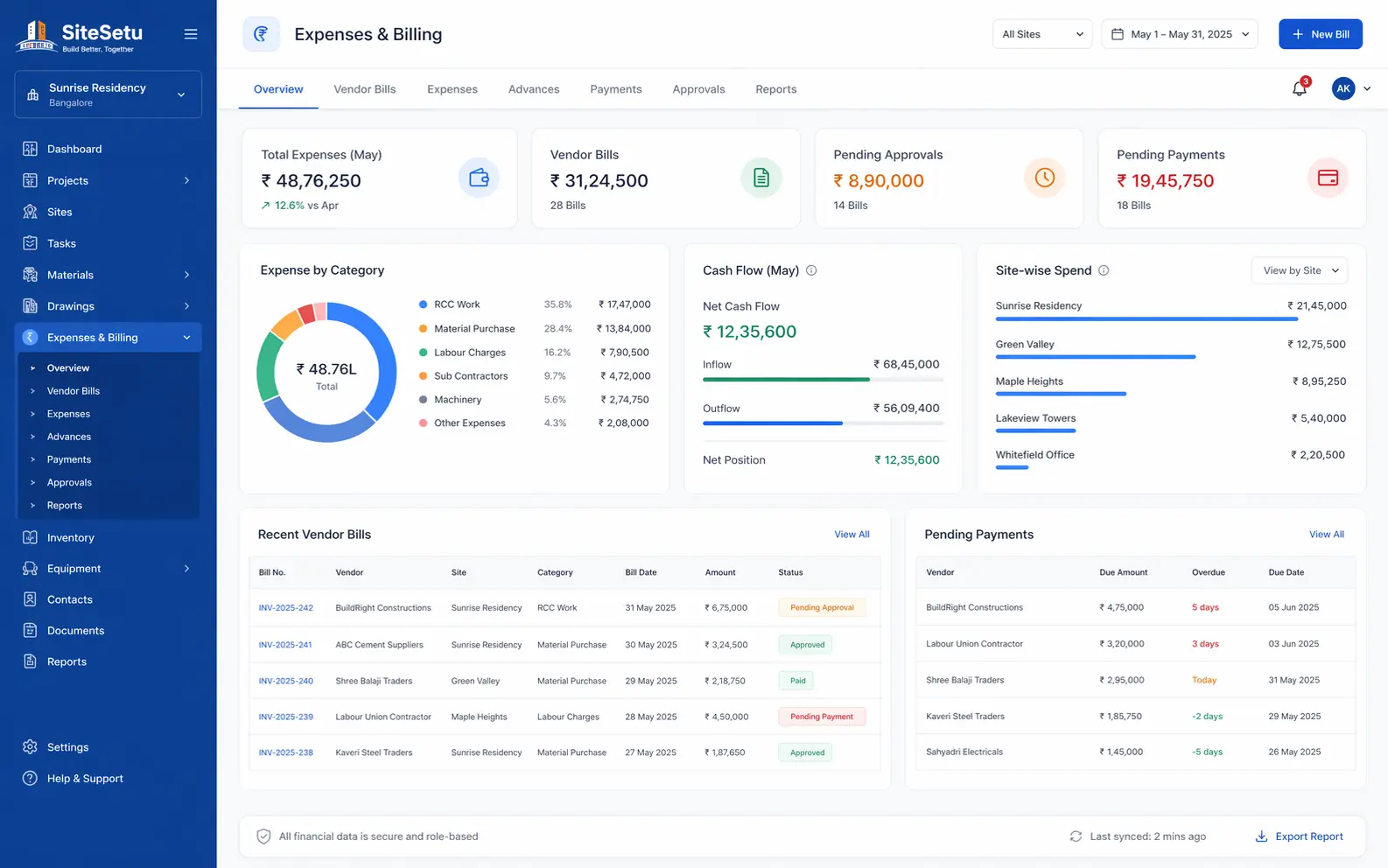
The faster the team can connect quantities, bill remarks, and document proof, the faster the billing cycle becomes easier to review.
Why billing control matters now
Commercial workflows are getting more compliance-sensitive, while site teams are already mobile-first.
Invoice reporting is now a system requirement
The GST e-invoicing rollout now reaches businesses above Rs 5 crore AATO, and from April 1, 2025 taxpayers at Rs 10 crore and above must report e-invoices within 30 days.
GST e-invoice mandate portalMSME payment timelines now hit your tax bill
Income-tax Section 43B(h) allows the deduction for micro and small supplier payments only when they are paid within the MSMED Act's 45-day limit. Slow payment follow-up is now a tax problem, not just a cash-flow problem.
Execution slippage quickly becomes a cash-flow problem
MoSPI continues to track hundreds of large projects with delays and cost revisions, which is a reminder that weak progress and billing visibility turns operational drift into commercial pain.
MoSPI project monitoring publicationsWithout a clean billing workflow
- Measurements are captured in one sheet, RA bills in another sheet, and the supporting photos live in WhatsApp or a drive folder.
- Subcontractor bills, client bills, deductions, and recoveries depend on one person remembering what happened in the previous cycle.
- Quantity disputes show up only at bill review because there is no clean trail from site execution to bill line items.
- Office teams cannot tell whether a bill is pending because measurements are incomplete, approvals are missing, or the work itself is delayed.
With connected construction billing software
- One billing workflow for measured quantities, supporting notes, RA bills, and payment follow-up.
- Cleaner records for client bills, subcontractor bills, retention, deductions, and variation items.
- Faster review because quantities, remarks, and proof sit in the same trail instead of separate files.
- A commercial view that stays connected to site execution, procurement, and daily progress data.
What the software should actually help your team do
A useful billing workflow starts before the invoice and stays connected to real site data.
Measurement-backed billing
Record quantities with location, photos, and remarks so every client or subcontractor bill has traceable backup instead of a late spreadsheet rebuild.
RA bill and running bill control
Keep previous bill quantities, current quantities, recoveries, deductions, and remarks in one workflow instead of separate Excel files and email threads.
Document trail for faster review
Link bills with drawings, DPR notes, MB-style records, approvals, and invoices so the commercial review is easier for both site and office teams.
Commercial and site context together
Connect billing with materials, quantities, and site blockers so the team can explain delays, pending quantities, and disputed items earlier.
A practical billing workflow for live projects
The goal is not more paperwork. The goal is a cleaner trail from execution to payment.
Capture quantities with context
Record work done by BOQ item, work package, or location so the bill starts from what was actually executed on site.
Attach the proof early
Keep photos, notes, drawing references, and exceptions attached to the same quantity trail instead of rebuilding the backup later.
Prepare the running bill
Roll previous certified quantities, current cycle quantities, deductions, and recoveries into one RA bill or subcontractor bill workflow.
Track review and payment follow-up
Know what is submitted, queried, approved, or still pending so cash-flow follow-up does not depend on private calls and memory.
A billing system should reduce rework, not create a new admin layer
The strongest setup is the one that lets the site team capture quantities once, attach proof once, and then reuse that same trail for running bills, review comments, and payment follow-up.
- BOQ-linked quantities that stay consistent from progress capture to billing support.
- Running bill preparation for clients, subcontractors, or internal commercial teams.
- Variation and extra-item notes when work moves outside the original bill scope.
- Support for invoice documents and payment follow-up once the bill is reviewed.
Next reads for the same topic cluster
RA bill guide
Read the full contractor-side guide to running account bills, deductions, and review cycles.
Measurement book guide
See how measurements, records, and bill support work on Indian construction projects.
Construction management app overview
See how Site Setu connects daily execution, quantities, documents, and billing support in one workflow.
Construction procurement software
Indents, PO approvals, GRNs, and vendor follow-up — the material trail that feeds verified quantities into billing.
Daily progress report (DPR) software
DPR photos are the backup for every measured quantity. See how daily reporting supports the bill.
Free templates and formats
Download indent, PO, GRN, DPR, and stock register formats to standardize the records behind every bill.
Work order format guide
Standardize subcontractor scope, rates, retention, extra work, and billing documents before the first RA bill.
Material reconciliation statement guide
Connect stock, issue, theoretical consumption, and variance checks before quantities turn into bill disputes or recovery arguments.
BOQ and estimation guide
Understand the commercial chain before billing: BOQ structure, quantities, and estimation logic.
Rate analysis guide
Break unit rates into material, labour, machinery, and overheads before quoting work or checking a bill.
Estimation and costing guide
Work through quantity takeoff, rate buildup, and cost heads before the BOQ turns into RA bills.
Construction cost per sq ft (2026)
Check city-wise benchmark rates before you sanity-check an estimate or a client budget.
Price escalation clause guide
Understand CPWD 10C/10CA/10CC, the WPI escalation formula, and how to compute escalation on running bills.
Frequently asked questions
Common questions contractors ask before they change the billing workflow.
What should construction billing software handle?
It should handle measured quantities, running bills, subcontractor bills, supporting documents, deductions, recoveries, invoice references, and payment-status follow-up in one workflow.
How is construction billing software different from accounting software?
Accounting software starts after the commercial paperwork is ready. Construction billing software starts earlier, from quantities, measurements, bill backups, review comments, and running bill preparation.
Can smaller contractors use billing software without a full QS team?
Yes. Smaller teams usually benefit quickly because one clean quantity-and-bill trail replaces repeated Excel edits, call-based follow-up, and monthly reconstruction of measurements.
Does billing software need to connect with site data?
Yes. Billing becomes easier to defend when quantities, DPR updates, photos, material context, and commercial remarks stay connected to the same work record.
Bring quantities, bills, and payment follow-up into one workflow
If your team is still rebuilding measurements and RA bill backups at month-end, the commercial workflow is already costing time and slowing cash flow. Site Setu helps teams keep the billing trail cleaner from the start.