Title Blocks, Sheet Numbers and Who Signed What
Lesson 3 of 32 · 7 min read

Two prints of the same staircase sheet are lying on the site table, and they show different landing levels. Which one do you build from? Shouting is one method. The other is the strip of boxes in the corner of every sheet - the title block - which answers the question in ten seconds: same sheet number, different revision, and the revision table says which print is current and what changed. This lesson teaches you to read that strip the way a cashier reads a currency note.
Anatomy of the title block
Layouts differ office to office (Indian drawing practice is standardized at the level of sheet sizes and conventions by IS 962, not title-block graphics), but nearly every block carries the same fields:
- Project name and address - which job this is.
- Client / developer - who the drawing is for.
- Consultant identity - the architect's or engineer's firm, often with registration details.
- Drawing title - what the sheet shows, e.g. PLAN AT LOWER GROUND LVL.
- Sheet number - the sheet's address inside the set.
- Scale - the drawing's stated scale(s); meaningless on a resized print, as the next lesson shows.
- Date - of first issue, with revision dates in the revision table.
- Drawn / Checked / Approved - initials of who produced, who verified, who authorized.
- Status stamp - words like TENDER, GFC (Good For Construction), or FOR APPROVAL. Only a GFC-status sheet is meant to be built from; module 5 lives in this distinction.
- Revision table - the sheet's diary, one row per issue.
Sheet numbers: the set's address system
A typical Indian sheet number packs three facts: the discipline (A for architectural, S or ST for structural, P/E/F for services), a series or level group, and a serial within it. So an architectural sheet numbered in the 100s might be plans, 200s elevations, 300s sections - or the digits might encode the floor. There is no universal national convention - the numbering logic lives in the office's own standard, and the drawing register is the decoder ring. What you can always rely on: the number plus the revision uniquely identifies a print. Quote both, always - "as per A-104 R2" is an instruction; "as per the plan" is a future argument.
The revision table: the sheet's diary
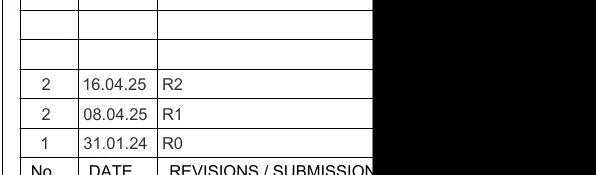
Every time a sheet is reissued, a row is added: revision code, date, and a short description of what changed. Convention on Indian projects (and in the excerpts you will see): R0 is the first formal issue, then R1, R2 and so on. Here is a real one, from a staircase section sheet of Project A, the nine-storey commercial tower:
How to read this
- Find the header row at the bottom of the crop: No, DATE, REVISIONS / SUBMISSION - the table's columns.
- Read upward from the bottom row, oldest first: row 1 dated 31.01.24 carries R0, the first formal issue of this sheet.
- Continue up: 08.04.25 is R1 and 16.04.25 is R2 - the current revision on this print, issued only eight days after R1.
- Note the fourteen-month quiet between R0 and R1, then the rapid R1-to-R2 burst: that clustering is design churn during execution, a signal to double-check you hold the latest issue before building.
- The blacked-out area covers the change descriptions and initials (redacted here). On your own project, that description column is the first thing to read - it says what changed so you do not have to hunt for it.
Read the rows bottom-up, oldest first:
| No | Date | Revision |
|---|---|---|
| 1 | 31.01.24 | R0 |
| 2 | 08.04.25 | R1 |
| 2 | 16.04.25 | R2 |
Three things worth noticing on this small crop:
- The rhythm of the dates. R0 was issued on 31.01.24; nothing for over fourteen months; then R1 on 08.04.25 and R2 just eight days later on 16.04.25. That burst is what design churn during execution looks like - something on site forced two rapid reissues. When you see tight revision clusters, slow down: the information is still settling.
- The description column is where the gold is - it says what changed, so you do not have to play spot-the-difference across the whole sheet. (On this excerpt that column, along with reviewer initials, is redacted for anonymity; on your project it is the first thing to read.)
- Even the serial column has a story: the No column reads 1, 2, 2 - two rows sharing an entry number. Real title blocks contain such quirks; the revision codes and dates, not the serials, are what you rely on.
Who signed what - and why you care
The Drawn / Checked / Approved row is not ceremony. The checker's initials mean a second person verified the drawing; the approver's mean the consultant's responsible principal authorized its release. On disputes - a dimension that cannot be built, a clash between sheets - your written query goes to the issuing consultant, and the signature row tells you whose desk it lands on. Site engineers who note "approved by" names in their query letters get faster, more careful responses. It is also your protection: an unsigned or unstamped sheet is not an authorized instruction, and building from it transfers the risk to you. When in doubt about a sheet's authority, the register plus the signature row - not the person who handed you the print - is what you rely on.
Worked example: the price of building from R1
Suppose the change between R1 (08.04.25) and R2 (16.04.25) moved a door opening in a 230 mm brick wall by one bay. Your team, holding R1, built the opening in the old position on 12.04.25 - before R2 existed. The correction, at indicative mid-2026 rates:
| Item | Calculation | Amount |
|---|---|---|
| Dismantle brickwork (new opening) | 1.2 x 2.1 x 0.23 = 0.58 cum @ Rs. 1,800/cum | Rs. 1,050 |
| New lintel over the opening | lump sum | Rs. 1,500 |
| Infill old opening in brickwork | 0.58 cum @ Rs. 7,500/cum | Rs. 4,350 |
| Plaster both faces of infill | 2 x 2.52 = 5.04 sqm @ Rs. 320/sqm | Rs. 1,613 |
| Repaint | 5.04 sqm @ Rs. 35/sqm | Rs. 176 |
| Total | ~ Rs. 8,700 |
Now the decisive question: who pays? If your drawing-received log (lesson 1) shows R2 reached site only on 18.04.25, the rework is a client-side change - you bill it as a variation with the log as evidence. If the transmittal shows R2 was issued to you on 16.04.25 and you cast on 17.04.25 without checking, the Rs. 8,700 is yours. Same brick, same mortar - the paperwork decides whose money it is. (Commonly applied practice; your contract's variation clause governs.)
The habit that follows: before executing from any sheet, match its revision against the register, and record the date you received it. Thirty seconds per sheet.
Common mistakes
- Filing prints by file name or date instead of sheet number + revision. "LG plan final (2).pdf" is not an identity; "A-104 R2" is.
- Assuming the print in your hand is current. The revision table only tells you that print's history - the register tells you whether a newer revision exists.
- Reading the top row as the oldest. Tables grow upward on most Indian sheets - the bottom row (R0) is the first issue. Check the dates, not the position.
- Quoting drawings without revision codes in site instructions, measurement books and RA bills - the omission that turns every later disagreement into a memory contest.
What comes next
The title block tells you whether to trust the sheet. The next lesson reads the fine print that tells you how to use it: the general notes and legends - including the clause on a real Project A sheet that quietly outranks every drawn line on it.
Key takeaways
- The title block is the sheet's identity card: project, title, sheet number, scale, date, signatures, status and revision history.
- Sheet number plus revision uniquely identify a print - quote both in every instruction, MB entry and bill.
- Revision tables grow upward on most Indian sheets: R0 at the bottom is the first issue; read dates, not row positions.
- On the Project A excerpt, R0 (31.01.24) was followed fourteen months later by R1 (08.04.25) and R2 (16.04.25) - tight clusters signal live design churn.
- Drawn/Checked/Approved initials fix accountability; an unsigned or non-GFC sheet is not an authorized instruction to build.
- Whether rework money is yours or the client's often turns on your dated drawing-received log versus the revision issue date.
Verify on site
- Before executing from any sheet, match its revision code against the drawing register.
- Read the newest revision row and its description before reading the drawing itself.
- Confirm the sheet carries a GFC or equivalent buildable status stamp, not TENDER or FOR APPROVAL.
- Record the date each revised sheet physically or digitally reaches site, next to its entry in the register.
- Quote sheet number + revision in every site instruction, query, MB entry and bill reference.
- When two prints of one sheet exist on site, immediately mark the older revision SUPERSEDED and remove it.
Check your understanding
4 questions. Answering them marks this lesson complete — results stay on your device.
Want the free certificate?
The whole course is free and open — no signup needed to learn. Enter your details only if you want us to track your progress on this device and issue a named certificate after the final assessment.