Revision Clouds, Triangles and the Revision Register
Lesson 22 of 32 · 6 min read

On a facade sheet of Project A, the nine-storey commercial tower, somebody drew a wobbly, scalloped bubble around a single note and reissued the sheet. That bubble is not decoration and it is not a highlight of a problem. It is the drawing's built-in changelog: this content changed in this issue — read it again before you build. This lesson teaches the three devices that carry a sheet's change history — the revision cloud, the revision triangle, and the revision register — using real examples of all three from one project, including two register formats that do not even agree with each other.
The cloud: where to look
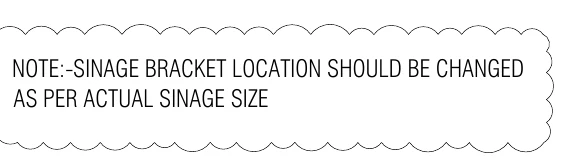
How to read this
- Trace the boundary: a chain of small scallops forming a closed bubble — that shape is the standard revision cloud.
- Read the note inside exactly as printed: NOTE:- SINAGE BRACKET LOCATION SHOULD BE CHANGED AS PER ACTUAL SINAGE SIZE.
- Register the meaning: everything inside the cloud changed in this issue of the sheet, so it must be re-read before building.
- Spot the typo — SINAGE for signage. Typos survive on real sheets; the intent governs, and a genuinely ambiguous note becomes an RFI, not a guess.
Here is a real revision cloud, drawn around a coordination note on a facade sheet. Read it exactly as printed: NOTE:- SINAGE BRACKET LOCATION SHOULD BE CHANGED AS PER ACTUAL SINAGE SIZE. Two things to learn, one small and one large.
The small one first: the word is misspelt — SINAGE for signage — and it survived at least one issue cycle on a live commercial project. Typos survive on real sheets. The intent governs, and if the intent is genuinely ambiguous you raise an RFI; you do not build your own interpretation of a garbled note.
The large lesson is what the cloud means. A revision cloud marks changed content, not wrong content. When a sheet is reissued, the drafter clouds whatever moved, was added, or was rewritten since the previous revision, so a reader comparing prints knows exactly where to look instead of proof-reading the whole sheet. Office practice varies — many offices delete the previous issue's clouds and cloud only the latest changes, others accumulate them — so confirm the convention with your consultant. Either way, a cloud is an instruction to slow down at that spot.
Next to a cloud you will usually find a small triangle — the revision triangle, or delta — with the revision number inside it. The triangle is the key that ties the clouded change to one specific row of the revision register: a triangle carrying 2 says "this change arrived with R2, see the register row R2 for its date and description". Cloud says where, triangle says which issue, register says when and what.
One honest caveat: clouds are a courtesy, not a contract. Drafters miss things, and an unclouded change is still a change. The register row and the sheet content govern; the cloud only helps you find the difference faster. That is why the superseded-print comparison discipline of the next lesson exists.
The register: the sheet's diary
Indian drawing-office practice — codified in IS 962, the code of practice for architectural and building drawings — requires every alteration to a drawing to be recorded, and the recommended form is a panel carrying the revision number or letter, the date, a brief record of the change, and the initials of the approving authority, placed continuous with the title block. That panel is the revision register, and you already met one in Lesson 1. Look at it again, this time for anatomy rather than content.
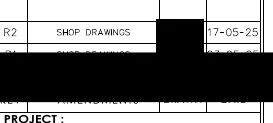
How to read this
- Find the PROJECT strip at the bottom — the register panel sits directly above the title block, as standard practice places it.
- Identify the half-cropped header row where AMENDMENTS is readable: the columns are revision, amendment description, drawn-by and date.
- Read the top filled row: R2 — SHOP DRAWINGS — 17-05-25. The description here names the document purpose rather than the specific change.
- Note the redacted row below R2 — an earlier issue is logged there on the real sheet. Newest sits on top.
Columns: revision, amendments (the brief description), drawn-by, date. The header row sits at the bottom, hard against the title block, and issues stack upward — the newest row, R2 dated 17-05-25, sits on top. On this sheet the amendment description is simply the document's purpose, SHOP DRAWINGS, repeated per issue; on richer sheets the description names the actual change.
Now the second register format, from a different sheet of the same project — the reissued terrace sheet you will dissect fully in the next lesson.
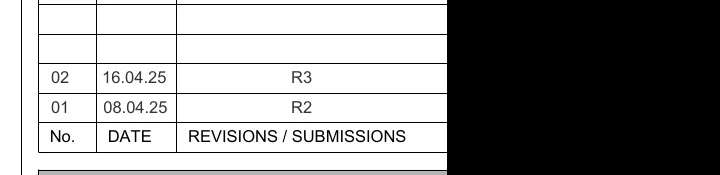
How to read this
- Read the header at the bottom: No. | DATE | REVISIONS / SUBMISSIONS — different columns from the shop-drawing register on the same project.
- Row 01: dated 08.04.25, logging revision R2. Row 02: dated 16.04.25, logging revision R3.
- Do the date arithmetic: R3 followed R2 by only 8 days. Revisions cluster during active execution.
- Catch the trap: serial 01 carries revision R2 — the No. column only counts entries in this table. Always quote the R-number and date, never the serial.
- The blank ruled rows above the entries are waiting for the next issue; the black patch at right is a redaction for this course.
Read the header first, because it is a different animal: No. | DATE | REVISIONS / SUBMISSIONS. Then the rows above it: 01 — 08.04.25 — R2, and 02 — 16.04.25 — R3. Same project, same discipline of newest-on-top, but different columns — and one genuinely dangerous subtlety: the serial in the No. column does not match the revision number. Row 01 logs revision R2. The serial only counts entries in this table; the R-number is the sheet's true revision identity. If you skim the left column and report "this sheet is at issue 02", you have just understated the revision history. Always read the R-value and its date; treat the serial as furniture.
The blank rows above the entries are not decoration either — they are pre-ruled space waiting for the next issue. A register with empty rows above the latest entry is a sheet that expects to change.
Worked drill: dating your print
Registers turn into protection only when you do arithmetic on them. Take the terrace register above and run a realistic timeline:
| Date | Event |
|---|---|
| 08.04.25 | R2 issued (register row 01) |
| 10.04.25 | Your site office receives and files the R2 print |
| 16.04.25 | R3 issued (register row 02) — only 8 days after R2 |
| 18.04.25 | Your team sets out work from the filed print |
Gap between R2 and R3: 16.04 minus 08.04 = 8 days. If your office filed R2 on the 10th and nobody chased the transmittal log again, then on the 18th your team is building from a print that has been stale for two days — and this project really did reissue that fast. Revisions cluster exactly when drawings are being used hardest: during execution. The busier the sheet, the shorter its shelf life.
So here is the 30-second verification habit, in order, every time a drawing decision is about to become concrete:
- Title block: read the revision box on your print — say it holds R2.
- Register: read the top filled row of the register on your print — it must agree with the title block.
- Transmittal: check the latest transmittal or drawing-issue record from the consultant for this sheet number. If it lists R3, your print is dead.
- Clouds and triangles: on the current print, find every triangle carrying the latest rev number and read what its cloud encloses.
- Purpose: confirm the issue purpose says GFC (or approved shop drawing for vendor scope) — a rev row that says TENDER or FOR APPROVAL is not permission to build.
Common mistakes
- Assuming newest-at-bottom. Both registers on this project stack newest-on-top with the header at the bottom; other offices do the opposite. The header row tells you which way the diary reads — find it first.
- Reading a cloud as a defect marker. It marks change, not error. The panic response is wrong in both directions: no panic at the cloud, and no comfort in its absence.
- Trusting the serial column. As the terrace register shows, entry 01 can be revision R2. Report sheets by R-number and date, never by table serial.
- Comparing clouds instead of content. If a change was not clouded, it still binds you. When stakes are high, compare the two revisions line by line in the changed zone.
- Stopping at the print in your hand. The register on your print can only prove what your print knows. Only the transmittal log or the consultant's current issue register can prove nothing newer exists — which is exactly the discipline of the next lesson.
Where this goes next
You can now read a sheet's diary. The next lesson builds the site system around it — the master drawing register, the SUPERSEDED stamp, and the print-control routine that keeps the R2 print from ever meeting a chhajja shutter again — taught on a real 2024-versus-2025 reissue of one terrace sheet.
Key takeaways
- A revision cloud marks content that changed in an issue — it is a changelog pointer, not a defect flag, and its absence proves nothing.
- The revision triangle's number keys a clouded change to one specific register row: cloud says where, triangle says which issue, register says when and what.
- IS 962 practice records every revision in a panel — number, date, brief record, initials — placed continuous with the title block.
- Register formats vary even within one project: find the header row first to learn which way the table reads, and trust the R-number plus date, never the table serial.
- On the real terrace sheet, R3 followed R2 by just 8 days — a print filed between two issues goes stale in under a week during active execution.
- Your print's register can only prove what your print knows; only the transmittal log or the consultant's issue record proves nothing newer exists.
Verify on site
- Before building from any sheet, read the title-block revision box and confirm it matches the top filled row of the revision register.
- Cross-check the sheet's revision against the latest transmittal or drawing-issue record — not just against other prints on site.
- Locate every revision triangle carrying the latest rev number and re-read what each associated cloud encloses.
- Confirm the issue purpose column reads GFC (or approved shop drawing for vendor scope) before treating the sheet as buildable.
- When a clouded note is ambiguous or contains an obvious error, log an RFI instead of building an interpretation.
- Quote sheets in reports and MB entries by revision number and date, never by register serial number.
Check your understanding
5 questions. Answering them marks this lesson complete — results stay on your device.
Want the free certificate?
The whole course is free and open — no signup needed to learn. Enter your details only if you want us to track your progress on this device and issue a named certificate after the final assessment.