Construction Management App
for Indian builders and contractors
Keep site and office teams on the same page. Track tasks, materials, drawings, and expenses in one place.
Built for site teams and project managers across India
Explore by Role
Role-specific workflows for contractors, builders, engineers, and store teams using one construction management app.
Start with the page that matches your goal
Pick the hub that fits how you are evaluating Site Setu, then drill into the next step.
App overview
See the full construction management app story in one place.
Open pageDPR software
See how daily progress reporting fits into a field-ready workflow.
Open pageBOQ & billing guide
Connect quantity, measurement, procurement, and RA billing in one workflow.
Open pageProduct modules
Jump into WBS, inventory, drawings, quality, equipment, and CRM.
Open pageRole workflows
Find the page for contractors, builders, site engineers, and stores.
Open pageTemplates and calculators
Use ready-made formats to standardize field work faster.
Open pageCompare alternatives
Shortlist the right tool by comparing Site Setu with common options.
Open pageImplementation guides
Read practical articles for rollout, adoption, and evaluation.
Open pageIf you are evaluating operations first, start with DPR reporting, inventory, tasks, or drawings.
Construction management app FAQs
Answers to the most common evaluation questions from Indian construction teams.
Who is Site Setu built for?
Site Setu is built for Indian builders, contractors, site engineers, storekeepers, and project controls teams that need one system for daily execution and reporting.
What workflows should teams launch first?
Most teams start with task and daily progress tracking, inventory and procurement visibility, and drawing control because those workflows create the fastest operational clarity.
Can Site Setu work across site and office teams?
Yes. Site Setu is designed to keep field and office users aligned on tasks, materials, drawings, quality follow-up, and approvals without relying on scattered WhatsApp updates.
How quickly can a team go live?
A focused pilot can start in days on one active project, with most teams establishing a reliable daily usage rhythm within the first month.
Replace scattered tools
with one system built for site work
Stop juggling separate tools for tasks, materials, drawings, and expenses.
Inventory & Procurement Records
Multiple sheets, manual errors, and no audit trail when the team updates files separately.
Track indents, POs, GRNs, and issues in one system with automatic numbering and history.
Import to WBS Tasks
Schedules stay in planning tools and never make it to the site teams.
Import .mpp files into Site Setu and keep hierarchy and dependencies intact.
Drawing Revisions
Version confusion and missing markup make it hard to know which drawing is current.
Create drawing records, upload revisions, and keep review notes in one place.
Equipment & Work Logs
Manual logbooks go missing and equipment usage data is never consolidated.
Maintain equipment masters, work logs, and maintenance records with cost visibility.
Site Updates & Requests
Updates get buried in chats, and it is hard to trace approvals or attachments later.
Capture task updates, indents, and documents in one shared workspace with clear records.
Shared CRM Directory
Vendor and client contacts stay on personal phones with no shared context.
Keep a shared contact directory with tags and a simple stage pipeline.
1 of 6
The Problem
Your site runs on chaos. It does not have to.
The Solution
One construction management app. Complete control.
Everything your site needs in one app
Built for how Indian construction sites actually work. This construction management app is mobile-first, focused, and practical.
WBS & Task Management
Break down projects into clear tasks with dependencies and timelines. Import from MS Project and track progress across locations.
Inventory & Indent Management
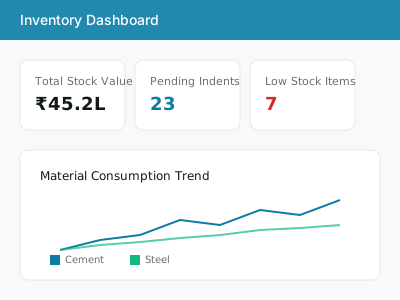
Complete Indent to PO to GRN to Stock to Issue workflow. Multi-store tracking with automatic numbering and full audit trail.
Quality Management
Digital checklists for quality inspections. Photo documentation, approval workflows, and non-conformance tracking.
Safety Management
Safety checklists, incident reporting, and compliance tracking. Keep your site safe with digital safety protocols.
Expense Management
Petty cash management with receipt capture. Categorized expense tracking with approval workflows and budget monitoring.
CRM - Bookings & Meetings
Manage customer bookings, schedule site visits, and track meetings. Keep all customer interactions organized.
Drawing Management
Centralized drawing repository with revision tracking. View, annotate, and share drawings with your team.
Equipment Management
Track equipment allocation and maintenance schedules. Work logs and assignment management with utilization reports.
Construction Tools
Built-in calculators, MS Project viewer, DWG viewer, and PDF marking tools. Everything you need in one place.
Want a closer look at how this construction management app works? Explore all modules, browse role-based workflows, compare alternatives, or download templates and checklists.
Why Site Setu
Purpose-built for Indian construction teams who need field-ready tools, not desktop software.
Mobile-First
Built for field teams who work from phones and tablets, not desktops.
9 Integrated Modules
Tasks, inventory, drawings, expenses, CRM, equipment, safety, quality, and tools in one app.
MS Project Import
Bring your existing project plans into Site Setu without rebuilding from scratch.
Multi-Store Inventory
Track materials across multiple stores with full indent-to-consumption traceability.
Up and running in 3 steps
Start with your core workflows and expand as your team adopts the platform.
Sign up and add your project
Create your account, add a project, and import from MS Project or start fresh.
Onboard your site team
Invite engineers, storekeepers, and supervisors so everyone works from the same records.
Get complete visibility
Track tasks, materials, and expenses with a clear audit trail.
Start Managing Your Site Today
See how one construction management app brings tasks, materials, drawings, and costs into one system your site team can actually use.
Talk to our team for a guided setup and rollout plan.